
If your Kuwait Mobile ID OTP is not received, do not repeatedly restart the complete registration process. First check the mobile number, cellular signal, SMS service and verification-code timer.
The OTP is a private, temporary code sent by SMS during Kuwait Mobile ID registration. You must enter it inside the official app before continuing to create your Mobile ID PIN.
Quick answer: First confirm that the prepaid SIM is still active. Kuwait prepaid numbers require periodic recharging to maintain service, and a temporarily suspended number may not receive the PACI OTP. Check the number and account status, confirm that normal SMS messages work, wait for the OTP timer, and request only one new code.
Prefer a quick visual guide? Watch this 45-second explanation in English, Nepali and Hindi.
First Identify Your OTP Problem
These problems look similar but require different checks:
| What happens | What it normally means |
|---|---|
| No SMS arrives | Number, cellular service, delayed SMS or PACI delivery problem |
| SMS arrives late | Network or service delay |
| Several codes arrive together | More than one code was requested |
| Code arrives but is rejected | The code may be old, mistyped or expired |
| App shows an error before the OTP screen | Registration data, internet connection or app problem |
Work through the following checks in order.
1. Check the Mobile Number Carefully
Return to the registration information and confirm every digit of the mobile number.
Check that:
- The number belongs to an active SIM you can access.
- No digit has been accidentally repeated or omitted.
- You entered the number in the format requested by the app.
- You did not enter a coworker’s or employer’s number by mistake.
- The SIM has not been disconnected or temporarily suspended.
The OTP will be sent to the number entered during registration. Never continue with a number that you cannot personally access.
2. Confirm That the Prepaid Line Is Still Active
A phone can display the SIM and its saved number even when the prepaid account has been temporarily restricted because it has not been recharged.
This is an important check in Kuwait because prepaid lines must be recharged within their validity period. Ooredoo’s terms state that prepaid service remains valid through recharging and may enter a grace period after expiry. Ooredoo Kuwait’s prepaid terms
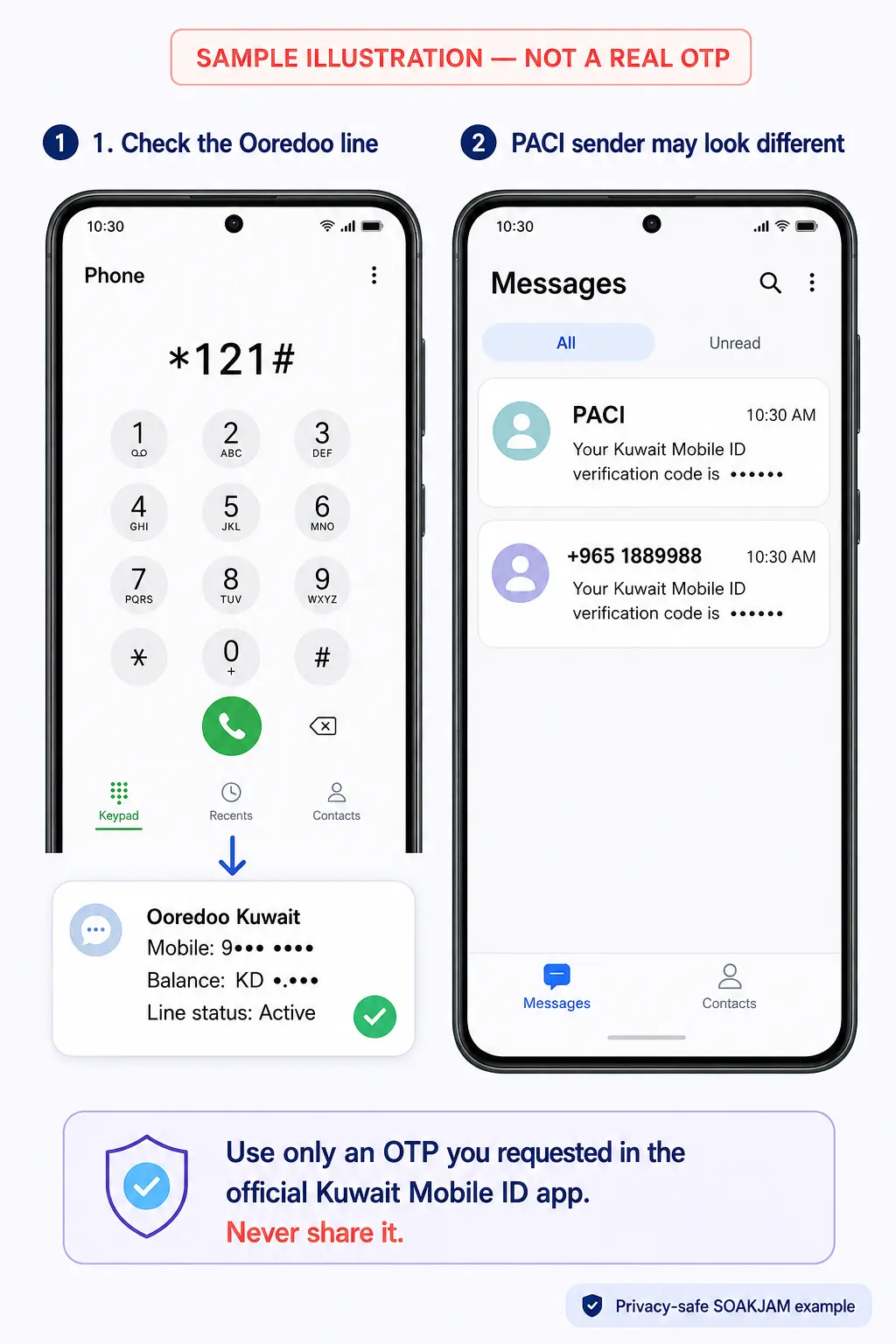
How to check an Ooredoo prepaid number
For an Ooredoo Kuwait prepaid SIM:
- Open the phone dialler.
- Dial
*121#. - Press the call button using the Ooredoo SIM.
- Wait for the USSD response.
In SOAKJAM’s practical experience, an active Ooredoo line normally returns account information or a menu showing the number and available balance. A normal response strongly indicates that the SIM can connect to Ooredoo’s account service. Ooredoo also officially lists *121# as one of its prepaid self-service codes. Ooredoo Help
If there is no response, the line shows a restriction, or the validity has expired:
- Recharge the prepaid number.
- Restart the phone after the recharge is confirmed.
- Test whether it can receive a normal SMS.
- Then request one new PACI OTP.
For Zain or STC, check the account status through the operator’s official application, USSD service or customer support.
Important: Having mobile signal bars does not always prove that a prepaid account is fully active. Confirm the account status and test an incoming SMS.
3. Wait for the Timer Before Requesting Another Code
Do not press the resend option repeatedly.
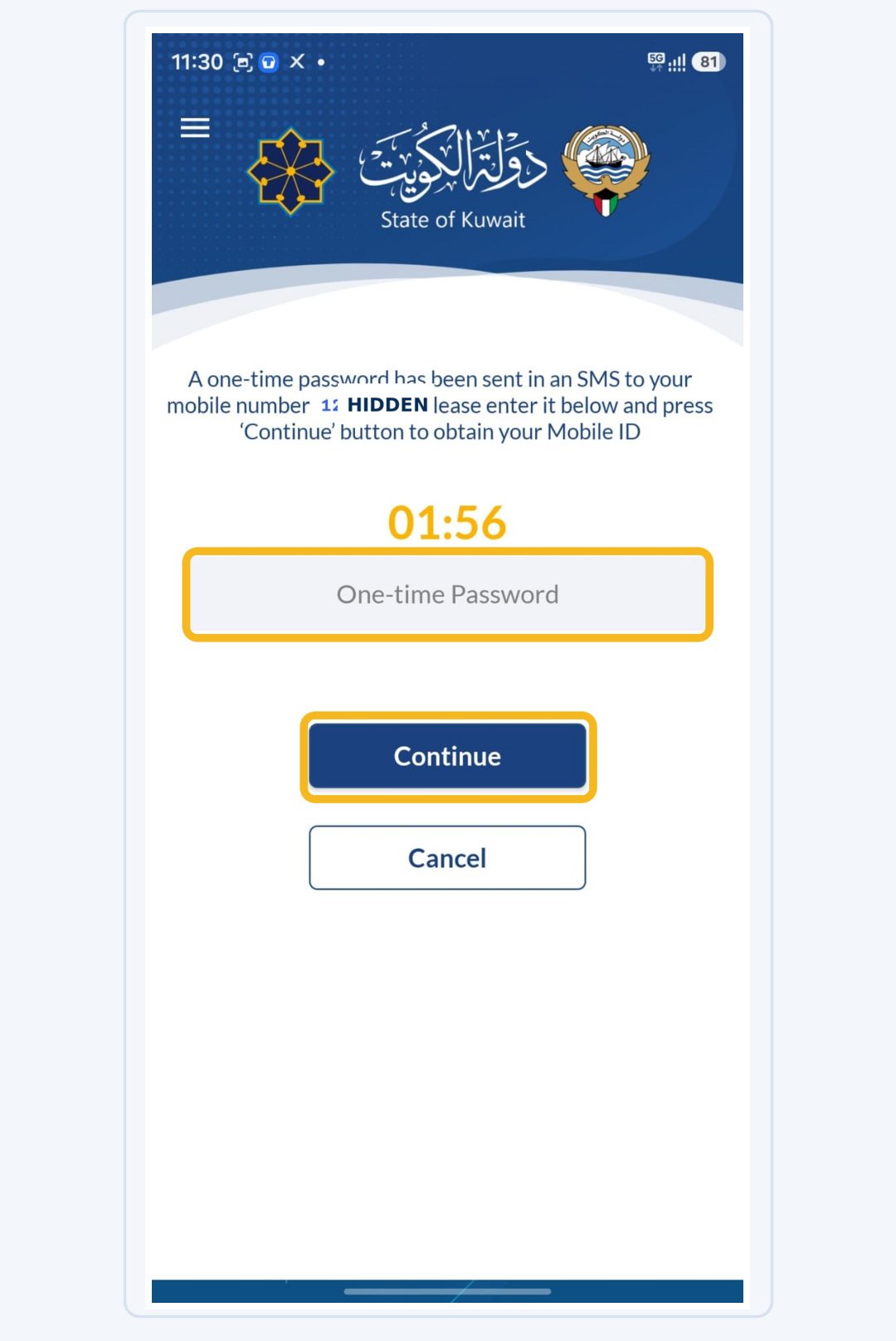
Wait until the timer on the OTP screen finishes. Then request one new code and allow time for it to arrive.
When several OTPs are requested, an earlier code may no longer work. Always use the most recently received code and enter it before the new timer expires.
Important: Never share an OTP with a coworker, typing centre, agent or someone claiming to provide technical support.
Do Not Be Confused by the PACI Sender Name
In SOAKJAM’s real registration experience, PACI-related OTP messages have not always appeared under exactly the same sender display.
The message may appear as:
PACI- A numeric sender connected with PACI’s
1889988service - The same numeric sender displayed with Kuwait’s
+965country code
Therefore, do not assume the OTP is incorrect only because the sender is shown as a number instead of PACI.
However, a sender name or number alone does not prove that a message is genuine. Use the code only when:
- You personally started registration inside the official Kuwait Mobile ID app.
- The message arrived immediately after your request.
- You enter the code only inside the official app.
- Nobody asks you to send or read the code to them.
PACI officially publishes 1889988 as its service number and provides MIDSupport@PACI.gov.kw for Mobile ID assistance. Official PACI FAQ
4. Refresh the Cellular Connection
A temporary cellular-network problem can delay an SMS.
Try these steps:
- Turn airplane mode on.
- Wait approximately ten seconds.
- Turn airplane mode off.
- Wait for the cellular signal to return.
- Check the SMS inbox again.
If the message still does not arrive, restart the phone once. Do not continue requesting new OTPs while restarting.
5. Check the Internet Connection Too
The OTP arrives through the mobile network, but the Kuwait Mobile ID app also needs a working internet connection to submit registration information.
Open a trusted website to confirm that internet access works. If Wi-Fi is unstable, try mobile data. If mobile data is unavailable, connect to a reliable private Wi-Fi network.
Avoid public Wi-Fi when registering an official digital identity.
6. Update the Official Kuwait Mobile ID App
Open Google Play, Apple’s App Store or Huawei AppGallery and check for an update.
Confirm that the application is:
- Named Kuwait Mobile ID هويتي.
- Published by the Public Authority for Civil Information.
- Updated to the latest version available for your device.
The official Android listing was updated on 5 June 2026. PACI currently lists support for Android 8 and later, although store requirements can change.
After updating, close the app completely, reopen it and try again carefully.
Do not install an APK or copy of the app received through WhatsApp or an unknown website.
7. Check Dual-SIM and Roaming Conditions
If the phone uses two SIM cards, confirm which number you entered during registration and make sure that SIM is active.
The OTP can be received on a different phone if you entered that phone’s number and can access it, but using your own active SIM makes the process safer and easier.
PACI says Mobile ID services can be used outside Kuwait. However, when travelling, the mobile number may still require working international roaming to receive SMS messages. Contact the operator if normal messages are also unavailable abroad.
8. Recheck the Registration Information
If the app returns to registration or shows an error before sending an OTP, check the information entered earlier:
- The full 12-digit Civil ID number
- The passport number recorded in the Kuwait residency system
- The card serial number, when required
- The email address
- The mobile number
New residents whose first physical Civil ID has not been printed can choose Registration Through your Mobile Phone and use manual entry. PACI says they do not need to enter the physical card serial number.
For the complete process, read:
- How to Register Kuwait Mobile ID for New Residents
- How to Find Your Kuwait Civil ID Number Using the MOI Number
- How to Check Kuwait Civil ID Status Online
PACI also says eligible residents must have a valid Civil ID record. People who recently renewed their Civil ID should complete any required issuance payment and allow the government records to update.
9. Contact Official PACI Mobile ID Support
If normal SMS messages work but the PACI OTP still does not arrive after careful retries, contact Kuwait Mobile ID support.
PACI currently provides these official channels:
- Support email:
MIDSupport@PACI.gov.kw - Chatbot on the official Kuwait Mobile ID website
- Support or Help page inside the official app
PACI asks users to include their Civil ID number, mobile number and a description of the problem.
You can use this email format:
Subject: Kuwait Mobile ID OTP not received during registration
Message:
Hello Kuwait Mobile ID Support,
I am trying to register through the official Kuwait Mobile ID app, but the OTP is not arriving on my mobile number.
Civil ID number: [enter privately]
Mobile number: [enter privately]
Phone model: [enter model]
App version: [enter if available]
Date and approximate time attempted: [enter details]
Normal SMS messages are working, and I have confirmed that the mobile number is correct. Please check and advise me on the next step.
Thank you.
Send personal information only to the confirmed official PACI address. Never include your OTP, Mobile ID PIN, phone-unlock code, email password or bank information.
What If the OTP Arrives but Does Not Work?
If the SMS arrives but the app rejects the code:
- Confirm that you entered every digit correctly.
- Use the newest code if several messages arrived.
- Check whether the timer has expired.
- Avoid copying extra spaces with the code.
- Wait for the timer before requesting one replacement code.
- Enter the replacement code immediately.
Do not keep trying an expired or older code.
Frequently Asked Questions
Can an inactive prepaid number prevent the PACI OTP from arriving?
Yes. A temporarily restricted or expired prepaid line may be unable to receive service messages. Recharge the account if necessary, confirm that normal SMS messages are arriving, and then request one new OTP.
Why did my PACI OTP come from a number instead of “PACI”?
The sender display can vary between phones or mobile operators. Based on SOAKJAM’s real experience, a PACI-related message may appear under PACI or as a numeric sender connected with the official 1889988 service. Only use an OTP that you personally requested through the official app.
Why is my Kuwait Mobile ID OTP not received?
Common possibilities include an incorrect number, weak cellular service, delayed SMS delivery, blocked automated messages, repeated OTP requests or a temporary app or PACI service issue.
Should I request the OTP repeatedly?
No. Wait for the timer and request only one replacement code. Multiple requests can cause several codes to arrive, making it difficult to identify the newest one.
Can a new resident receive Kuwait Mobile ID before collecting the physical card?
Yes. PACI says new residents issuing their first Civil ID can use Registration Through your Mobile Phone without entering the physical card serial number.
Can I receive the OTP outside Kuwait?
PACI says Mobile ID services can be used abroad, but the mobile number must be capable of receiving SMS while roaming.
Who should I contact if the OTP still does not arrive?
Use the official PACI Mobile ID support email, website chatbot or Help page inside the app.
Is it safe to give an OTP to someone helping me?
No. The OTP should be entered only inside the official Kuwait Mobile ID app. PACI support should never require your OTP or PIN.
Final Reminder
If the Kuwait Mobile ID OTP is not received, check the number and SIM first, wait for the timer, request only one new code, update the official app and confirm that both cellular service and internet access work.
If other SMS messages arrive normally but the PACI code does not, contact official Kuwait Mobile ID support with the Civil ID number, mobile number, phone model and a clear description of the problem.
This guide was checked against the official PACI Kuwait Mobile ID information on 25 August 2026. App screens and requirements may change.
Transparency
Sources & references
Editorially reviewed
Editorial information
SOAKJAM articles are designed for clarity, useful context and transparent sourcing. Important facts should be checked against the linked primary sources.
Found an error, outdated detail or a useful source we should consider?