
If you have recently arrived in Kuwait, you may need to find your Kuwait Civil ID number before receiving the physical Civil ID card. You might already have an eVisa or residency document but still be unsure which number the Public Authority for Civil Information (PACI) has assigned to you.
PACI provides an official online service that converts the unified number issued by the Ministry of Interior—labelled MOI No. on the PACI form—into the corresponding Civil ID number. You can use it on a phone, tablet or computer without creating an account.
This guide explains how to find your Kuwait Civil ID number with real mobile screenshots from the official PACI website. Every sample number and personal detail shown below has been permanently covered.
Quick answer: Open the official PACI Services page, select MOI to Civil Number, enter your MOI or unified number, and press Submit. When PACI has a matching record, your Civil ID number appears below the form.
Last checked against the official PACI and Kuwait Government Online services on 21 August 2026. Government websites can change, so follow any newer instructions shown on the official page.
Watch the Quick Video Guide
The written instructions contain the same process and let you pause, zoom in, and compare each field carefully.
MOI Number, Unified Number and Civil ID Number
New residents often see several official numbers on the same document. They do not all serve the same purpose.
- MOI number: The name PACI uses for the number entered in its conversion form: MOI No.
- Unified number: Kuwait Government Online describes this as the number issued by the Ministry of Interior. It is the number the PACI service converts.
- Reference number: On the sample Kuwait eVisa in this guide, the relevant number appears beside Reference. Other documents can have a different layout, so confirm the label instead of relying only on its position.
- Civil ID number: The number PACI returns after finding the corresponding civil-information record.
Do not enter a visa number, passport number, Civil ID card serial number or date in the MOI No. field. If you cannot identify the correct number, ask the employer, sponsor, representative or office that processed your residency.
What You Need Before Starting
- A phone, tablet or computer with an internet connection.
- Your MOI or unified number.
- The visa, entry permit, residency document or official message where the number was provided.
- A private place to enter the number without other people viewing your screen.
You do not need to upload your document to SOAKJAM. Never post a complete visa or passport in a public group merely to ask which number to use.
How to Find Your Kuwait Civil ID Number Online
Step 1: Open the official PACI Services page
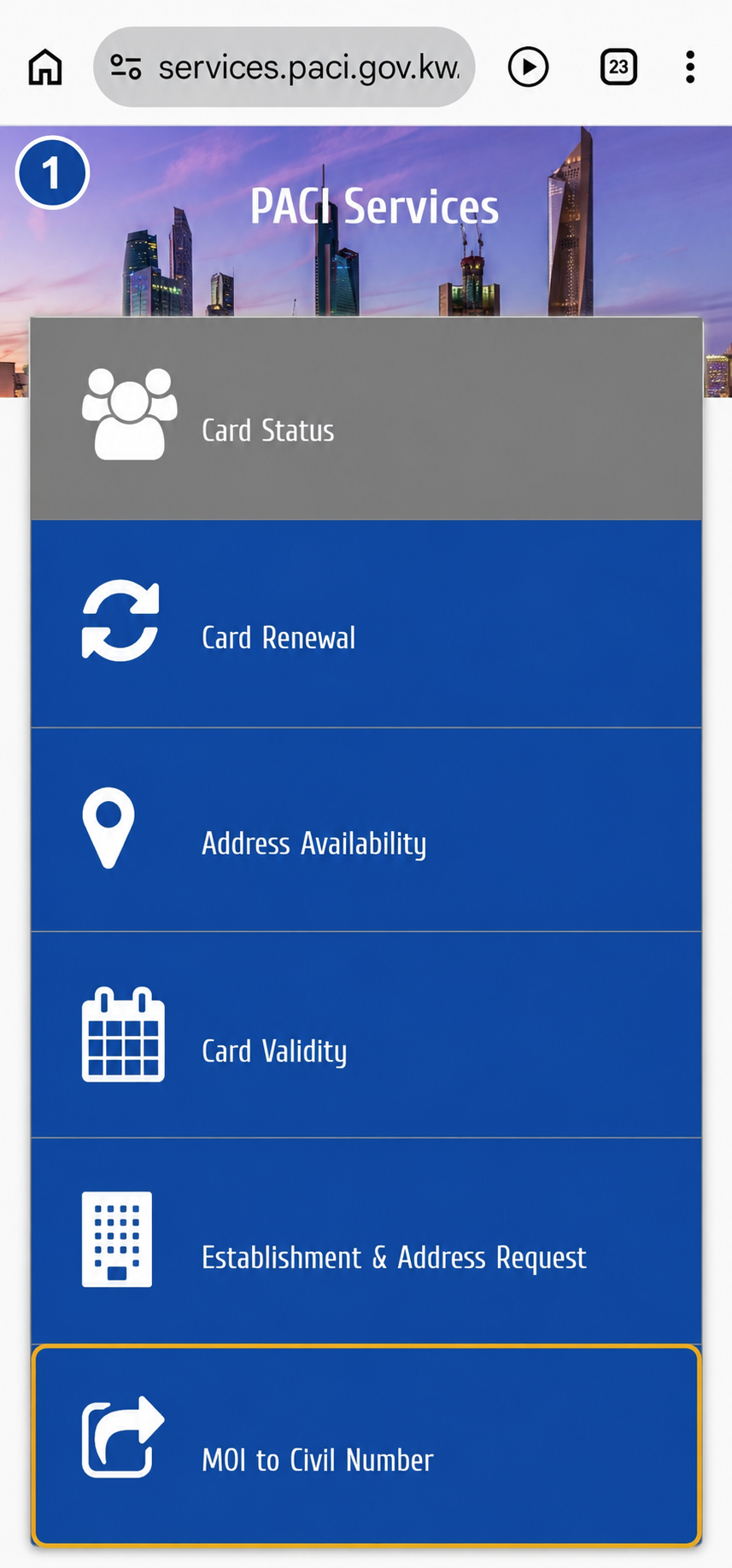
Open the official PACI Services page. Before entering personal information, confirm that the address bar shows services.paci.gov.kw. A copied page on another domain is not the official PACI inquiry.
Scroll through the available services and select MOI to Civil Number.
Step 2: Check the requested field
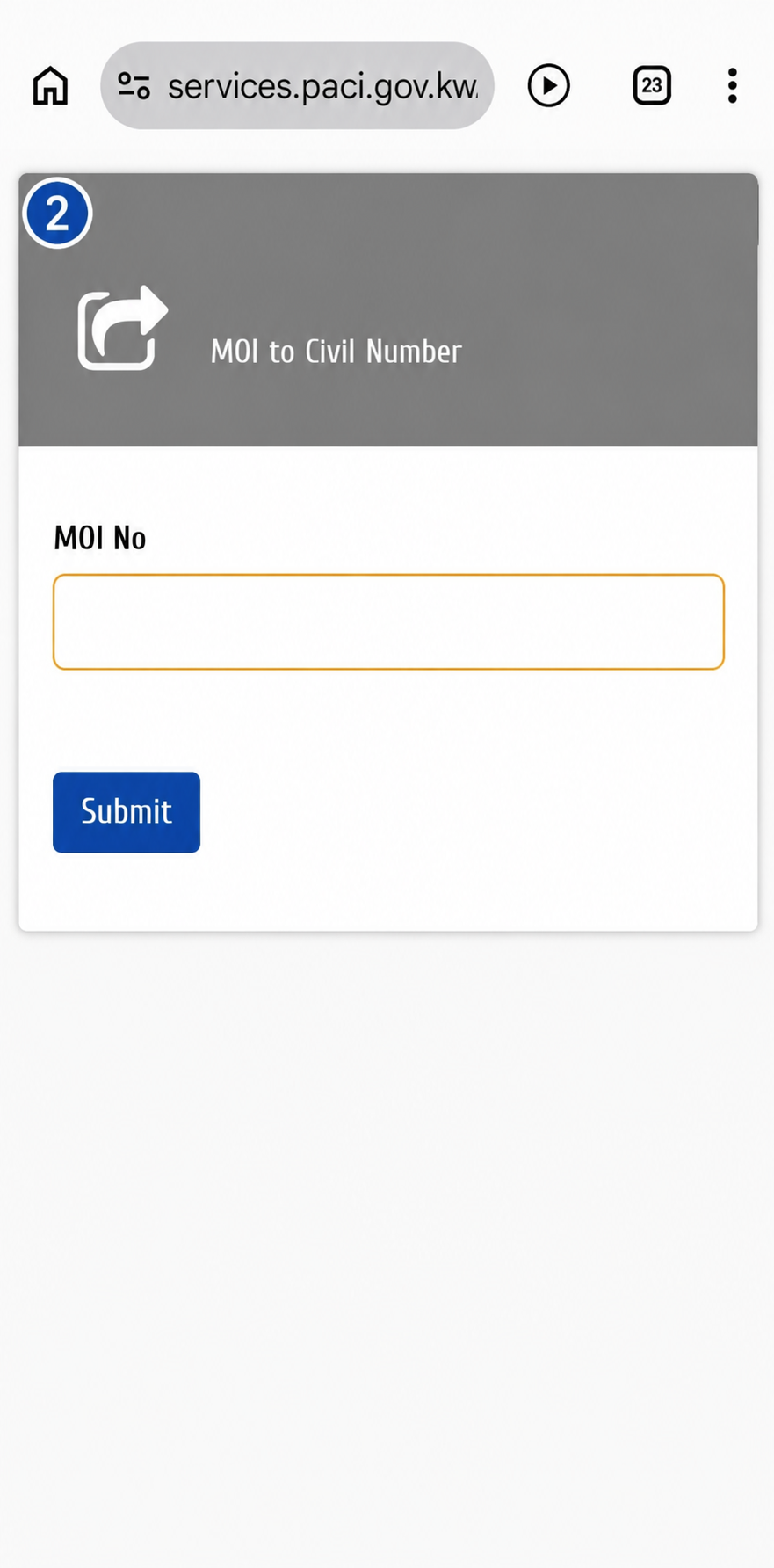
The conversion form contains a field labelled MOI No. and a Submit button. PACI is asking for the Ministry of Interior or unified number so it can return the associated Civil ID number.
Do not type the Civil ID number in this box. This inquiry is specifically for people who need to discover that number.
Step 3: Locate the number on your document
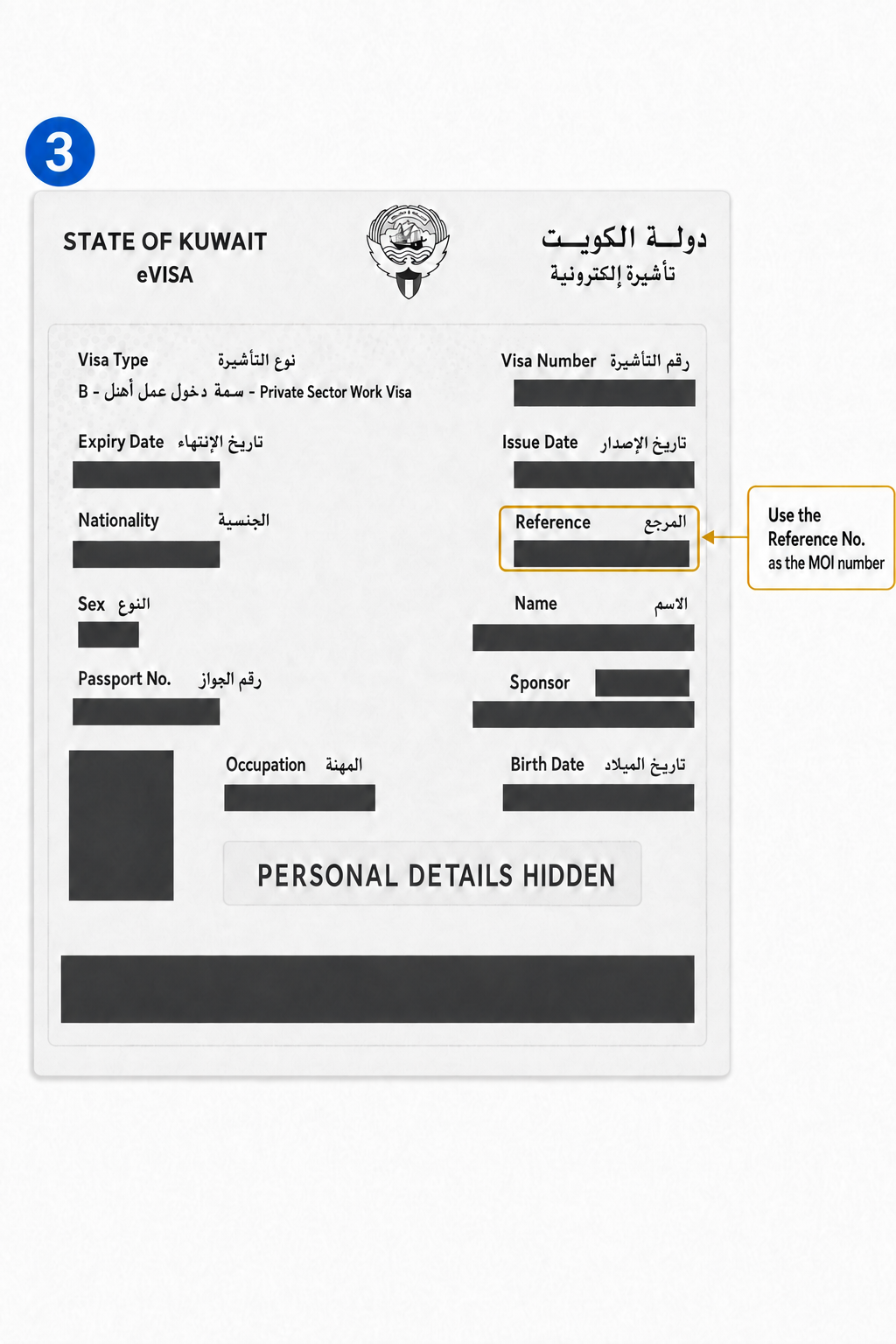
Examine your own document carefully. On the sample eVisa below, the number used in the PACI form appears beside Reference. The nearby Visa Number and Passport No. are different identifiers.
Your document may not look exactly like this sample. When the wording is unclear, do not guess or share the full document publicly. Ask the office that handled your residency to confirm your MOI or unified number.
Step 4: Enter the number and submit
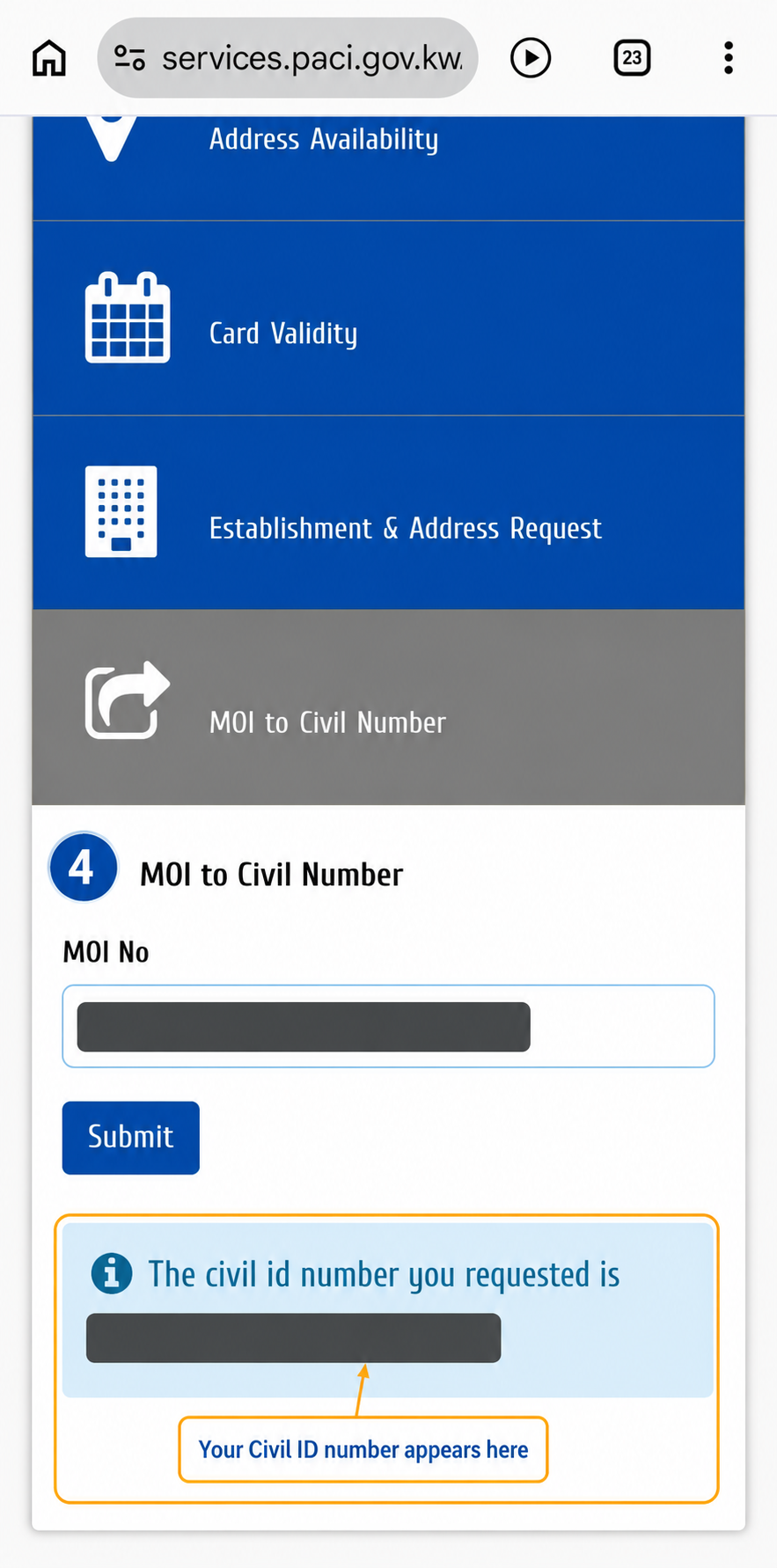
Return to the PACI form and type the MOI number carefully. Check every digit and avoid adding spaces before or after the number. Then press Submit once.
When PACI finds a matching record, a message beginning “The civil id number you requested is” appears beneath the form. The number displayed under that message is your Civil ID number.
What to Do After Finding the Number
Save the result in a secure place and check that you copied all 12 digits correctly. Avoid sending the number unnecessarily in public WhatsApp groups, social-media comments or unprotected screenshots.
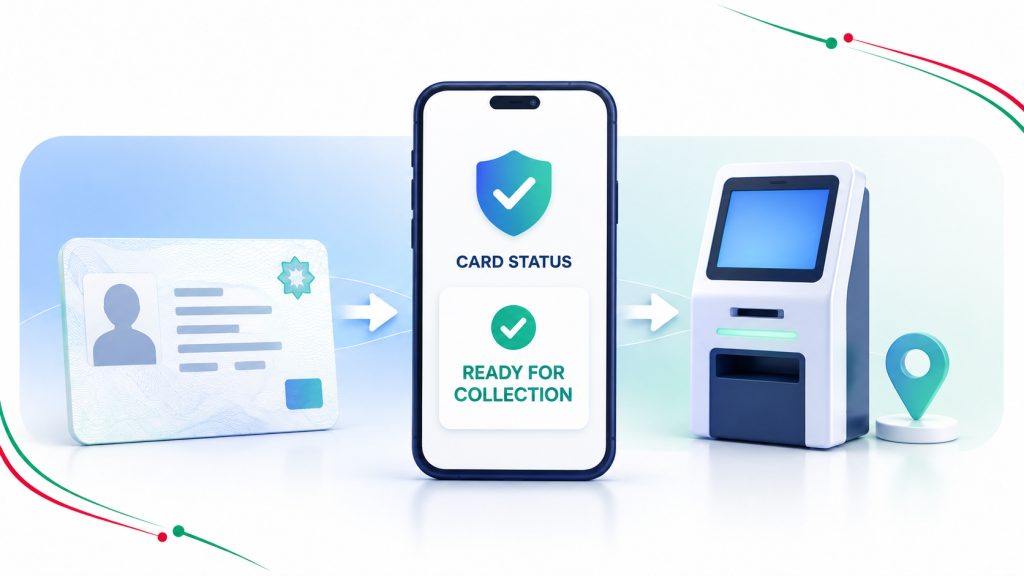
The next practical step is to check your Kuwait Civil ID card status online. PACI can show whether the physical card is still processing or ready for collection.
If the physical card is not ready, eligible new residents can also follow SOAKJAM’s guide to register Kuwait Mobile ID. That separate tutorial explains the mobile-registration path and its requirements.
What If PACI Does Not Return a Number?
A blank result does not automatically mean your residency has failed. Check the simple causes first:
- Confirm that you selected MOI to Civil Number, not Card Status, Card Validity or Card Renewal.
- Recheck every digit and remove any accidental spaces.
- Make sure you did not enter the visa number, passport number or another document field.
- Reopen the official PACI page and try again in a current browser if the form did not load or respond normally.
- If your residency was completed very recently, the matching PACI record may not yet be available. Check again later rather than submitting repeatedly.
- Ask the employer, sponsor, representative or office that processed the residency to verify the MOI number and application status.
- If official assistance is still required, use the contact information published on PACI’s own website.
Do not pay an unknown website, social-media account or messaging contact merely to perform this basic inquiry. The official conversion form itself does not ask for card payment.
Privacy and Safety
- Confirm that the website address belongs to
paci.gov.kwbefore entering the number. - Do not share a complete eVisa, passport, Civil ID, MOI number or PACI result publicly.
- Use a permanent opaque cover—not a weak blur—before publishing an instructional screenshot.
- The MOI-to-Civil-number inquiry does not require a bank-card number, email password, social-media password or one-time password.
- Close the page after use on a shared phone or computer.
SOAKJAM is an independent educational website. It is not affiliated with PACI, the Ministry of Interior or the Government of Kuwait.
Frequently Asked Questions
Is the MOI number the same as the Civil ID number?
No. Kuwait Government Online describes this service as converting the unified number issued by the Ministry of Interior into a Civil ID number. The identifiers relate to the same person but are not the same number.
Is the unified number the same number PACI calls MOI No.?
For this conversion service, PACI labels the input MOI No., while Kuwait Government Online calls it the unified number issued by the Ministry of Interior.
Where can I find the MOI number?
On the eVisa example shown here, it appears beside Reference. Other document layouts can differ. Ask the employer, sponsor or processing office to confirm the correct number if the label is unclear.
Can I enter my visa or passport number instead?
No. Enter the MOI or unified number requested by the PACI form. A visa number and passport number are separate identifiers.
Do I need a PACI account?
The official inquiry page provides a direct MOI-number field and Submit button. The process shown in this guide does not require signing into an account.
Can I use the service on a computer?
Yes. These screenshots use a mobile phone because many newcomers access PACI that way, but the official service also works in a desktop browser.
Why might PACI show no matching result?
The number may have been entered incorrectly, the wrong identifier may have been used, or a recently completed residency record may not yet be available in PACI. Verify the input and contact the responsible office if the problem continues.
What should I do after finding my Civil ID number?
Keep the number private, then use the official PACI card-status service to check the physical card. If appropriate, you can also proceed with Kuwait Mobile ID registration using the separate guide linked above.
Final Reminder
You can find your Kuwait Civil ID number before collecting the physical card. Use only the official PACI MOI to Civil Number service, enter the correct MOI or unified number, and protect the returned Civil ID number as personal information.
Transparency
Sources & references
Reviewed and updated
Editorial information
SOAKJAM articles are designed for clarity, useful context and transparent sourcing. Important facts should be checked against the linked primary sources.
Found an error, outdated detail or a useful source we should consider?