

What is a QR code and how does it work? A QR code is a two-dimensional barcode made from a grid of light and dark squares. A phone or scanner detects the grid, identifies its built-in patterns, corrects some reading errors and decodes the stored data.
QR codes appear on tickets, restaurant menus, product packaging, payment terminals, posters, business cards and official documents. They are convenient because they can connect something physical to digital information without making a person type a long address or code.
Quick answer: A QR code stores data as a pattern of square modules. A camera captures the pattern, software finds its position and orientation, reads the data and error-correction information, then offers an appropriate action—such as opening a website, displaying text or joining a Wi-Fi network. Scanning a code does not automatically prove that its destination is safe.
What Does QR Mean?
QR stands for Quick Response. DENSO WAVE developed the QR Code in Japan in 1994 for fast, reliable tracking in manufacturing. The design later spread far beyond factories because it could hold more varied data than a conventional one-dimensional barcode and could be read rapidly from different directions.
ISO/IEC 18004 defines the technical requirements for the QR Code symbology, including data encoding, symbol format, error correction and decoding. The current ISO edition is ISO/IEC 18004:2024.
What Is a QR Code Made Of?
To understand how a QR code works, it helps to look at the parts of the square. The tiny light and dark squares are called modules. They are not placed randomly.
A standard QR code contains several kinds of patterns:
- Finder patterns: the three large square targets near the corners help a scanner locate the code and determine its orientation.
- Timing patterns: alternating modules help the reader determine the grid’s rows and columns.
- Alignment patterns: these help compensate for perspective or distortion, especially in larger symbols.
- Format and version information: these indicate technical settings needed for decoding.
- Data modules: these represent the encoded message.
- Error-correction modules: these allow some missing or damaged data to be reconstructed.
- Quiet zone: clear space around the outside helps the scanner separate the code from its surroundings.
Covering a finder pattern, removing the quiet area or placing the code on a visually busy background can make it harder to scan even when much of the central grid remains visible.
How Does a Phone Read a QR Code?
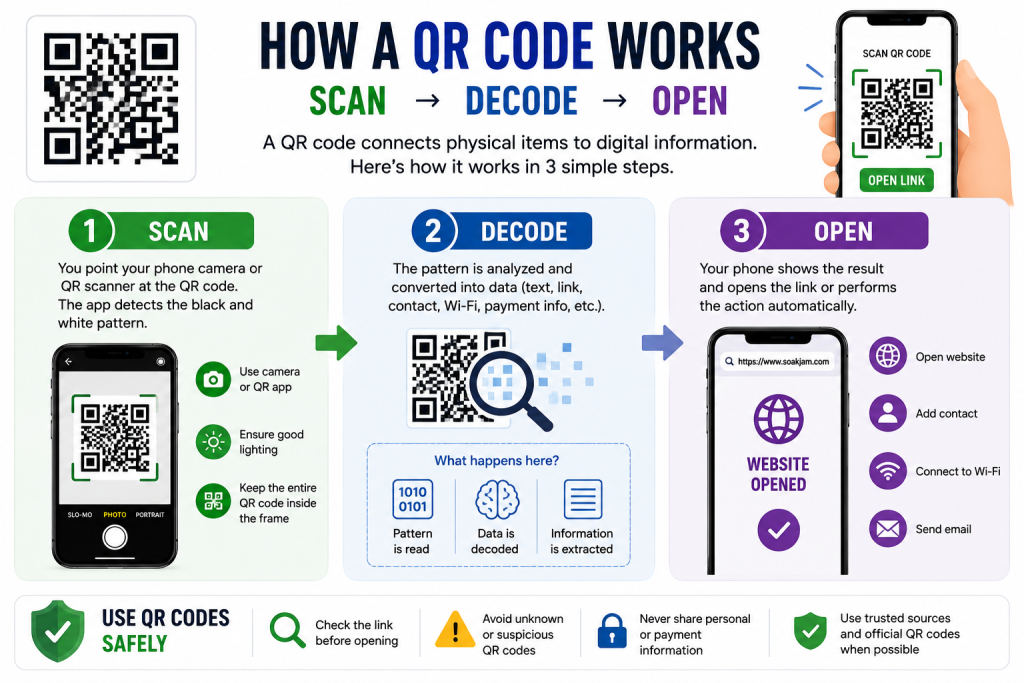
When a camera sees the code, the scanning software generally performs several tasks:
- It finds the three large corner patterns and separates the symbol from the background.
- It estimates the code’s angle, size and grid.
- It samples the light and dark modules.
- It reads format, version, data and error-correction information.
- It reconstructs the encoded message.
- It identifies the kind of data and shows a suitable action.
When the message is a web address, the phone may show a preview and offer to open the site. Plain text can appear directly, while a compatible phone may offer to join a Wi-Fi network when the code contains its connection details.
The camera captures an image, but the decoder performs the important work. That is why an ordinary photo of a QR code can sometimes be scanned later from a gallery or with an image-recognition feature.
How Is Information Stored?
Software first converts the input into an appropriate data mode. QR Code supports modes for numeric characters, alphanumeric characters, bytes and certain Japanese characters. Control information tells the decoder which mode and length to expect.
The encoded data is combined with error-correction information and arranged through the symbol according to defined rules. A masking pattern is also applied to prevent visual arrangements that would be difficult for scanners to interpret. The decoder reverses these steps when the code is scanned.
More data normally requires more modules. DENSO WAVE lists 40 standard QR Code versions: Version 1 begins at 21 × 21 modules, and each higher version adds four modules to each side until Version 40 reaches 177 × 177 modules.
What Can a QR Code Contain?
A QR code can represent many kinds of data, including:
- a website address;
- plain text;
- a phone number or email address;
- contact-card information;
- Wi-Fi network details;
- calendar or event information;
- a location;
- an application link;
- a ticket or account identifier; or
- payment instructions understood by a particular service.
The square itself does not decide what happens. It only contains data. The phone, application or service interprets that data and decides which action to offer.
Why Are There Three Large Squares?
The three prominent corner targets are finder patterns. Their arrangement helps a reader detect the symbol and recognise how it is rotated. This contributes to the ability to scan a normal QR code from different directions instead of requiring one fixed orientation.
The remaining corner does not contain a fourth full finder pattern. Its absence helps the software distinguish the symbol’s orientation. Larger versions include smaller alignment patterns elsewhere in the grid to help when the printed surface or camera angle introduces distortion.
How Does Error Correction Work?
QR codes use Reed–Solomon error correction. The encoder adds calculated recovery information alongside the original data. If part of a symbol is unreadable, the decoder may use the remaining codewords and recovery information to reconstruct what was lost.
DENSO WAVE describes four selectable levels:
| Level | Approximate codeword restoration | Typical trade-off |
|---|---|---|
| L | About 7% | More room for data, less recovery |
| M | About 15% | Common general-purpose balance |
| Q | About 25% | More recovery, larger symbol |
| H | About 30% | Highest standard recovery, lower data capacity |
These figures refer to codewords, not a promise that the same percentage of any visible area can be covered. Damage to critical patterns, poor contrast, severe distortion or a missing quiet zone can prevent scanning. A code that has been heavily decorated should always be tested rather than assumed to work.
Static and Dynamic QR Codes
The terms static and dynamic describe how a QR-code solution is managed; they do not describe two different square-reading technologies.
Static QR code
A static code directly contains its final data. If it contains https://soakjam.com, that exact address is encoded in the grid. Changing the destination requires generating and distributing a new code.
Static codes can work without relying on a redirect provider, although the destination itself may still require internet access.
Dynamic QR code
A service often calls a code “dynamic” when the grid contains a managed redirect address. The service owner can later change where that redirect leads without reprinting the square. The service may also provide scan statistics.
This convenience creates a dependency: if the redirect account, subscription, domain or provider stops working, the printed code may also stop reaching its intended destination. Consider that dependency before choosing a dynamic service for a long-term sign or document.
Do QR Codes Require Internet?
Decoding the pattern does not always require an internet connection. A phone can read plain text, a phone number or other locally encoded data without going online.
Internet access is normally needed when the result points to an online destination, such as a website, cloud document, payment page or app store. A dynamic redirect also requires the redirect service to be reachable.
How to Scan a QR Code on iPhone
Apple’s current instructions allow scanning through the Camera app or Code Scanner:
- Open Camera or Code Scanner.
- Position the phone so the entire code appears in the frame.
- Wait for the recognised link or action.
- Read the preview, then tap it only if the destination is expected.
The official Apple QR-scanning guide also explains how to add Code Scanner to Control Center.
How to Scan a QR Code on Android
Android steps vary by manufacturer and software version. On supported Google phones and cameras:
- Open the Camera app.
- Point it at the whole code without taking a photograph.
- Wait for the link or information bubble.
- Check the result before opening it.
Some phones also include a Scan QR Code tile in Quick Settings or allow scanning through Google Lens. Google provides current instructions for Camera from Google. Other Android brands may place the option elsewhere.
How to Scan a Code Already on Your Phone
If the code is inside a screenshot, email or saved image, look for a QR-recognition or image-search option in the gallery, photo viewer or browser. On supported Android devices, Google Lens can analyse an existing image. Apple devices may recognise supported data through Photos or related visual-recognition features.
Do not send a private ticket, identity document or payment code to an unknown online scanner. An on-device feature is safer when the image contains sensitive information.
Are QR Codes Safe?
A QR code is not automatically safe or unsafe. It is a container for data, much like a printed link. The problem is that people cannot normally read the destination by looking at the square.
Scammers can place a code in an email, message, package or public location that leads to a convincing imitation website. A fraudulent sticker can also be placed over a genuine restaurant, parking or payment code. The US Federal Trade Commission warns that malicious QR links may lead to phishing pages or malware.
In a payment or sign-in process, remember that the scan only delivers information. It does not verify the sender, website or requested transaction.
How to Scan More Safely
- Check where the code came from and whether you expected it.
- Inspect public stickers for signs that another label was placed on top.
- Read the destination preview before opening it.
- Check the spelling of the domain, especially before signing in or paying.
- Use an organisation’s official app or manually entered website for sensitive actions when possible.
- Do not provide a password, one-time code, bank information or identity document merely because a scanned page requests it.
- Be cautious when an unexpected message creates urgency or demands immediate payment.
- Keep the phone and browser updated.
If a suspicious code claims to come from a bank, employer or government office, contact that organisation through a number or website you already trust—not through the scanned destination.
Why Might a QR Code Not Scan?
Common causes include:
- blur or camera movement;
- poor lighting, glare or shadows;
- a dirty camera lens;
- the code being too small or too far away;
- low contrast between modules and background;
- missing clear space around the code;
- cropping, stretching or distortion;
- important patterns being covered;
- low-quality printing;
- an unsupported data type; or
- a destination that no longer exists even though decoding succeeded.
Try improving the light, cleaning the lens and changing the distance while keeping the entire square visible. If you created the code, test the original file and a printed copy on several phones.
Can a QR Code Expire?
A standard static QR code does not carry an automatic expiry date unless the encoded data or application defines one. A static website code can remain readable indefinitely, but the website may move or close.
Tickets, authentication requests and payment codes may expire because the system behind them enforces a time limit. Dynamic codes may fail if their redirect service or subscription ends. In each case, the printed grid may still decode even though the resulting action no longer works.
QR Code vs Traditional Barcode
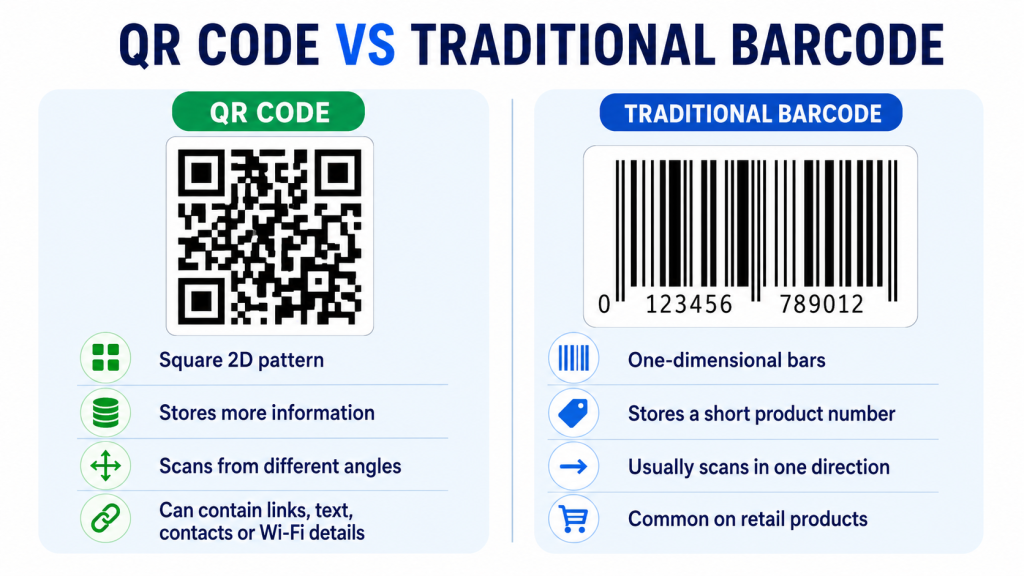
| Feature | QR code | Traditional one-dimensional barcode |
|---|---|---|
| Pattern | Square two-dimensional grid | Parallel bars and spaces |
| Reading | Uses information in two directions | Primarily read across one direction |
| Typical data | Text, addresses and varied application data | Often a short product or item identifier |
| Orientation | Finder patterns support rapid reading from different angles | Scanner alignment is more constrained |
| Error correction | Built-in selectable recovery levels | Depends on the barcode type and application |
A traditional retail barcode often identifies an item so a database can retrieve its details. A QR code can also hold an identifier, but it has enough flexibility to store a complete web address or other structured information directly.
How to Create a Reliable QR Code
- Decide exactly what the code should contain.
- Use a trusted generator and confirm whether the result is static or depends on a redirect service.
- Keep strong contrast and clear space around the square.
- Avoid stretching, cropping or covering important patterns.
- Use a size suitable for the expected scanning distance.
- Scan the finished code on multiple phones.
- Test the printed version, not only the image on a monitor.
- Recheck the destination before distributing large quantities.
You can use the SOAKJAM QR Code Generator to create a browser-based QR code. Review the encoded text or destination carefully and test the result before printing it on tickets, posters or business materials.
Frequently Asked Questions
Can a QR code be read without an app?
Many current iPhone and Android cameras can recognise QR codes directly. Availability and menu names depend on the device and software version. Some phones also provide a dedicated scanner in Control Center or Quick Settings.
Can a QR code contain an entire image or document?
A normal code has limited capacity. Instead of placing a large image or PDF inside the grid, most services encode a link to the online file. Opening that file then requires access to the destination and usually an internet connection.
Can two QR codes look similar?
Yes. Different inputs may produce patterns that look broadly similar to a person, but the modules encode different data. Do not identify a code by appearance; scan it and inspect the decoded result.
Does covering a QR code always stop it working?
Not always, because error correction may restore some missing codewords. Success depends on the correction level, what was covered and the overall print and scanning conditions. Covering critical patterns can cause failure even when the covered area seems small.
Does a QR code track me?
A static code containing plain text does not need to report a scan. A code that opens a website or managed redirect can allow that online service to record ordinary request information, subject to its systems and privacy practices. Read the destination’s privacy information when tracking matters.
What is a QR code and how does it work differently for payments?
The square is decoded in the same basic way, but a payment application interprets the stored details according to its own payment standard or service. Confirm the recipient and amount inside the trusted payment app before approving anything.
Conclusion
What is a QR code and how does it work? It is a standardised two-dimensional symbol that represents data through a square grid. A scanner uses its finder and alignment information to read the modules, applies error correction where possible and returns the decoded message.
The technology is useful because it turns a camera scan into a practical next step. Safe use still depends on the person: check the source, inspect the destination and confirm sensitive actions before continuing.
Transparency
Sources & references
- ISO — ISO/IEC 18004:2024 QR code symbology
- DENSO WAVE — What is a QR Code?
- DENSO WAVE — QR Code standardisation and specifications
- DENSO WAVE — QR Code error correction
- DENSO WAVE — QR Code versions and information capacity
- Apple Support — Scan a QR code with iPhone or iPad
- Google Help — Scan QR codes with Camera from Google
- US Federal Trade Commission — Scammers hide harmful links in QR codes
Editorially reviewed
Editorial information
SOAKJAM articles are designed for clarity, useful context and transparent sourcing. Important facts should be checked against the linked primary sources.
Found an error, outdated detail or a useful source we should consider?