

Introduction
A professional CV for job applications should help an employer understand, within a short time, who you are, what you can do and why your experience fits the vacancy. It should be accurate, easy to scan and focused on evidence—not decoration or exaggerated claims.
This guide explains how to organise a CV from beginning to end. It includes practical examples for experienced workers, first-time applicants, tradespeople and office staff, along with advice about privacy, photographs, employment gaps and online application systems.
Quick answer: Put your contact details first, add a short professional summary, list your most recent relevant experience, then include education, skills, training and languages. Tailor the wording to the vacancy, use a clean layout, check every fact and submit the file in the format requested by the employer.
What Is a CV?
CV stands for Curriculum Vitae. In many countries, employers use “CV” for the document submitted with an ordinary job application. In the United States and some other markets, “resume” is more common for most jobs, while “CV” may describe a longer academic record. Always follow the wording and requirements in the vacancy.
A typical professional CV for job applications may include:
- name and contact details;
- a short professional summary;
- work experience, volunteering or placements;
- education and qualifications;
- relevant technical and practical skills;
- training, licences and certifications;
- language ability; and
- other information that is genuinely relevant to the role.
The best order depends on your background. A person with several years of relevant employment will normally place work experience near the top. A recent graduate or first-time applicant may give more space to education, projects, placements, volunteering and transferable skills.
Read the Vacancy Before Writing
Do not begin by trying to describe everything you have ever done. First, read the vacancy carefully and identify the main duties, essential qualifications, required licences, software, languages and personal qualities.
Create a short list of the requirements you genuinely meet. Use the employer’s normal wording where it accurately describes your experience, but do not copy large sections of the advert or insert skills you do not have. Tailoring means making relevant evidence easy to find; it does not mean changing the truth.
For example, if a storekeeper vacancy asks for inventory records, Excel and material handling, those real skills should appear clearly in your summary, experience and skills sections. An unrelated task from an older job can receive less space.
Recommended Professional CV Structure
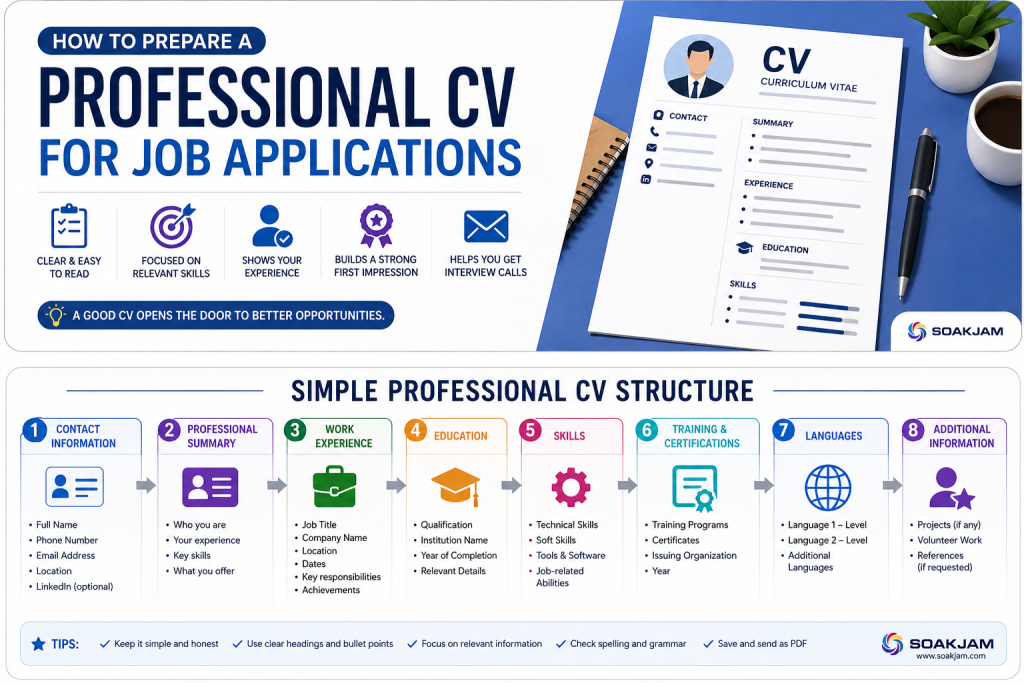
A clear professional CV for job applications can follow this order:
- Name and contact information
- Professional summary
- Work experience
- Education
- Skills
- Training, certifications and licences
- Languages
- Additional relevant information
This is a practical starting point, not a rule for every profession. Academic, scientific, creative and government applications may require a different structure or a specific template.
1. Start With Clear Contact Information
At the top, include the information an employer needs to identify and contact you:
- full name;
- phone number, including the correct country code when applying abroad;
- a professional email address;
- current city and country when relevant; and
- a LinkedIn profile or professional portfolio if it is current and useful.
An email based on your real name is usually easier to recognise than an unrelated nickname. Check that the phone number and email address are correct and that you can access them. A strong CV cannot help if the employer cannot contact you.
Do not automatically add passport numbers, Civil ID numbers, bank details, passwords or copies of identity documents. Supply sensitive documents only when there is a legitimate requirement and you have confirmed who is receiving them.
2. Write a Short Professional Summary
A professional summary is normally two to four lines below the contact details. It should identify your type of work, level of experience, strongest relevant abilities and the value you can offer.
Example for a store assistant:
Store assistant with three years of experience receiving, recording and issuing construction materials. Skilled in Excel stock records, safe material handling and coordination with supervisors and site teams.
Example for a new applicant:
Reliable technical-school graduate with practical electrical training, strong safety awareness and experience completing team projects. Ready to begin an entry-level electrician role and continue developing supervised site skills.
Avoid vague statements such as “hard-working person looking for any job.” A useful summary should match the kind of work you are seeking without pretending to have experience you do not possess.
3. List Work Experience Clearly
For most applicants, work experience is the main evidence in a professional CV for job applications. List the most recent role first, then continue backwards. For every relevant position, include:
- job title;
- employer or organisation;
- location;
- starting and ending month and year; and
- three to six concise bullets describing responsibilities and results.
Example:
Store Assistant — ABC Construction Company, Kuwait
March 2023–July 2026
- Received and checked incoming materials against delivery records.
- Updated daily stock movement in Excel and reported shortages to the supervisor.
- Prepared tools and materials for site teams according to approved requests.
- Maintained an organised storage area and followed workplace safety procedures.
Start bullets with clear verbs such as installed, recorded, prepared, inspected, coordinated, repaired or trained. Where it is honest and useful, add scale or results: the number of people supported, records maintained, projects completed, errors reduced or deadlines met.
“Recorded daily stock movement for three active sites” explains more than “did computer work.” Never invent figures. A simple accurate statement is better than an impressive claim you cannot support.
4. Add Education and Qualifications
Include the qualification, institution, location and completion year where appropriate. You may also mention relevant subjects, projects or distinctions, especially early in your career.
Example:
Diploma in Electrical Engineering
ABC Technical Institute, Nepal
Completed 2024
If you have extensive professional experience, education can be shorter. If education is your strongest evidence, place it before work history. Do not claim that an unfinished course was completed; describe it accurately as ongoing, partially completed or attended, depending on the situation.
5. Include Relevant Skills
A skills section should support the target job. It may include software, equipment, trade skills, administrative abilities, customer service or other demonstrated capabilities.
Useful examples can include Microsoft Excel, data entry, inventory control, electrical installation, welding, plumbing, first aid, equipment operation or multilingual communication. Choose only the skills you can explain or demonstrate in an interview or practical test.
Separate specific technical skills from broad qualities. “Microsoft Excel: stock lists, filters and basic formulas” is more informative than “computer expert.” Qualities such as teamwork or reliability are strongest when your experience bullets show evidence of them.
6. Add Training, Certifications and Licences
Relevant training can distinguish you from applicants with similar experience. Include the course or certificate name, provider and completion date. For licences or certificates that expire, show a current expiry date when helpful and confirm that the credential is still valid.
Examples include safety training, first aid, equipment licences, driving licences, technical courses and professional certifications. Do not attach every certificate to the first application unless requested. The CV can list them, and the employer can ask for evidence later.
7. Describe Language Ability Honestly
Language skills can matter in international and customer-facing workplaces. Use understandable descriptions such as native, fluent, professional working proficiency, intermediate, conversational or basic. Avoid claiming fluency if you cannot comfortably work in that language.
Example: Nepali — Native; English — Intermediate; Hindi — Conversational; Arabic — Basic.
Choose the Right CV Format
A reverse-chronological CV, which lists the latest experience first, works well for many applicants. A skills-focused or combination format may help when changing careers, returning after a long break or presenting strong transferable abilities. However, dates and employers should still be clear; hiding the work timeline can make the application harder to understand.
If the employer supplies a form or template, use it. Some government, academic and international applications require more detail than a normal private-sector CV.
Make the CV Easy to Read and ATS-Friendly
Some employers use applicant tracking systems (ATS) to store and search applications. A clean document also helps human readers, so the same basic choices benefit both.
- Use familiar headings such as Experience, Education and Skills.
- Choose a readable font and keep sizes consistent.
- Use simple bullets and enough white space.
- Keep dates aligned and written in one consistent style.
- Avoid placing essential information only inside images, decorative graphics or complicated text boxes.
- Do not hide keywords in white text or repeat them unnaturally.
- Use the requested file type and test the uploaded document.
A designed CV may be appropriate in some creative roles, but readability must remain the priority. Keep a simple version available for online application forms if the decorative version is difficult for software to read.
How Long Should a CV Be?
There is no universal page count for a professional CV for job applications. One page may be enough for a recent graduate or applicant with limited experience. Two pages are common when the person has several relevant roles, qualifications or projects. Academic and specialised CVs may be longer.
Remove repetition before reducing the font to an uncomfortable size. Every section should help the employer evaluate your suitability. Older or unrelated roles can receive fewer bullets, while recent relevant work gets more detail.
What If You Have Little or No Work Experience?
You can still prepare a professional CV for job applications. Use evidence from education, practical training, personal projects, volunteering, internships, family-business responsibilities or community activities.
For example, helping organise supplies for a community event can demonstrate planning and record keeping. Completing a technical project can show safe tool use, teamwork and problem solving. Describe what you actually did and connect it to the vacancy.
How to Handle an Employment Gap
An employment gap is not automatically a failure. People may pause work for health, caregiving, study, relocation, family responsibilities or job searching. Keep the dates honest and be ready to explain the gap briefly and professionally.
If you completed training, volunteered or developed relevant skills during that period, you may mention it. You do not need to publish private medical or family details on the CV. The UK National Careers Service advises applicants to be open and focus on useful skills gained during the gap.
Should You Add a Photograph or Personal Details?
Expectations vary by country, industry and employer. Some vacancies request a photograph; others discourage it. In some markets, information such as age, marital status or nationality is normally omitted. Check the employer’s instructions and the usual practice for the location where you are applying.
If a photograph is genuinely required, use a clear, recent and professional image with a simple background. Avoid heavy editing, filters and casual social-media photos. Do not include unnecessary identification numbers or documents in the CV.
Save and Send the Correct File
PDF often preserves layout well, but the employer’s instruction comes first. If the vacancy asks for DOCX, an online form or another format, submit that format. You can read SOAKJAM’s guide to choosing between PDF and common image formats before preparing the final document.
Open the final file and confirm that:
- every page displays correctly;
- no text is cut off;
- links work where links are expected;
- the file is not unnecessarily large;
- the filename identifies you; and
- you attached the correct version.
A filename such as Ram_Sharma_CV.pdf is clearer than document-final-new2.pdf.
Protect Your Information and Avoid Job Scams
A CV contains personal information. Send it through the employer’s official application channel or a recruiter you have verified. Be cautious if someone unexpectedly asks for a passport copy, bank information, payment, password or one-time code before providing verifiable details about the job.
Keep a record of where you submitted each version. If you publish a CV openly, remove information that does not need to be public, such as a full home address or private identification number.
Tailor the CV Without Keyword Stuffing
A professional CV for job applications should reflect the particular role. You do not need to rewrite every line each time, but you should review the summary, skill order and experience bullets.
- Electrician vacancy: emphasise electrical installation, maintenance, drawings, tools, safety training and relevant licences.
- Storekeeper vacancy: emphasise inventory, receiving, issuing, stock records, Excel and material handling.
- Office assistant vacancy: emphasise document preparation, data entry, communication, spreadsheets and administrative coordination.
Use important terms naturally where they describe your real work. Repeating the vacancy title many times does not prove experience and makes the document difficult to read.
Common CV Mistakes to Avoid
- incorrect phone number or email address;
- unclear or inconsistent dates;
- long paragraphs with no useful structure;
- vague descriptions such as “responsible for many things”;
- unrelated details taking space from relevant evidence;
- exaggerated skills, job titles or qualifications;
- too many colours, fonts, icons or decorative shapes;
- unnecessary sensitive personal information;
- spelling and grammar errors;
- sending the wrong file or an unclear filename; and
- ignoring the employer’s requested format or application method.
Final CV Checklist
Before submitting your professional CV for job applications, check each item:
- The name, phone number and email address are correct.
- The summary clearly matches the type of job.
- The most relevant evidence is easy to find.
- Job titles, employers and dates are accurate.
- Bullets explain real tasks, skills and results.
- Qualifications, training and licence details are truthful and current.
- Spelling, punctuation and spacing are consistent.
- The layout remains readable on every page.
- No unnecessary sensitive information is included.
- The final file opens correctly and follows the application instructions.
Frequently Asked Questions
Is a CV the same as a resume?
The words are used differently across countries. In many places, a professional CV for job applications is the normal document employers request. In the United States, a resume is usually a concise job-application summary, while a CV often contains a more detailed academic record. Follow the vacancy’s wording.
Should I use the same CV for every job?
Keep a complete master CV, then tailor a copy for each serious application. Adjust the summary and the order or emphasis of genuine skills and experience so they match the vacancy.
Should I include references?
Follow the employer’s instructions. If references are not requested at the first stage, you can normally leave their contact details off the CV and provide them later with each referee’s permission.
Can I use an online CV builder?
Yes, if you understand how your data will be stored and the result fits the vacancy. The European Union’s Europass CV editor is one official option. Always review the exported file instead of assuming the template has organised everything correctly.
What should I do if I cannot remember an exact date?
Check old contracts, certificates, payslips or records where possible. If the exact day is not important, month and year are usually clearer than inventing a date. Make sure the timeline is consistent with any application form.
Conclusion
A professional CV for job applications works best when it is clear, relevant, accurate and easy to verify. Begin with the vacancy, organise the strongest evidence logically, describe real work with specific language and protect unnecessary personal information. A simple, well-checked document will usually communicate more than a complicated design filled with repeated phrases.
Transparency
Sources & references
- UK National Careers Service — How to write a CV
- UK National Careers Service — Explain a gap in employment
- UK National Careers Service — The STAR method
- European Union — Europass CV editor
- CareerOneStop — Select the best resume format
- University of Pennsylvania Career Services — Resume and CV guidance
- UC San Diego Career Center — Resume guide
- UC Davis Career Center — Resume guidance
Editorially reviewed
Editorial information
SOAKJAM articles are designed for clarity, useful context and transparent sourcing. Important facts should be checked against the linked primary sources.
Found an error, outdated detail or a useful source we should consider?