

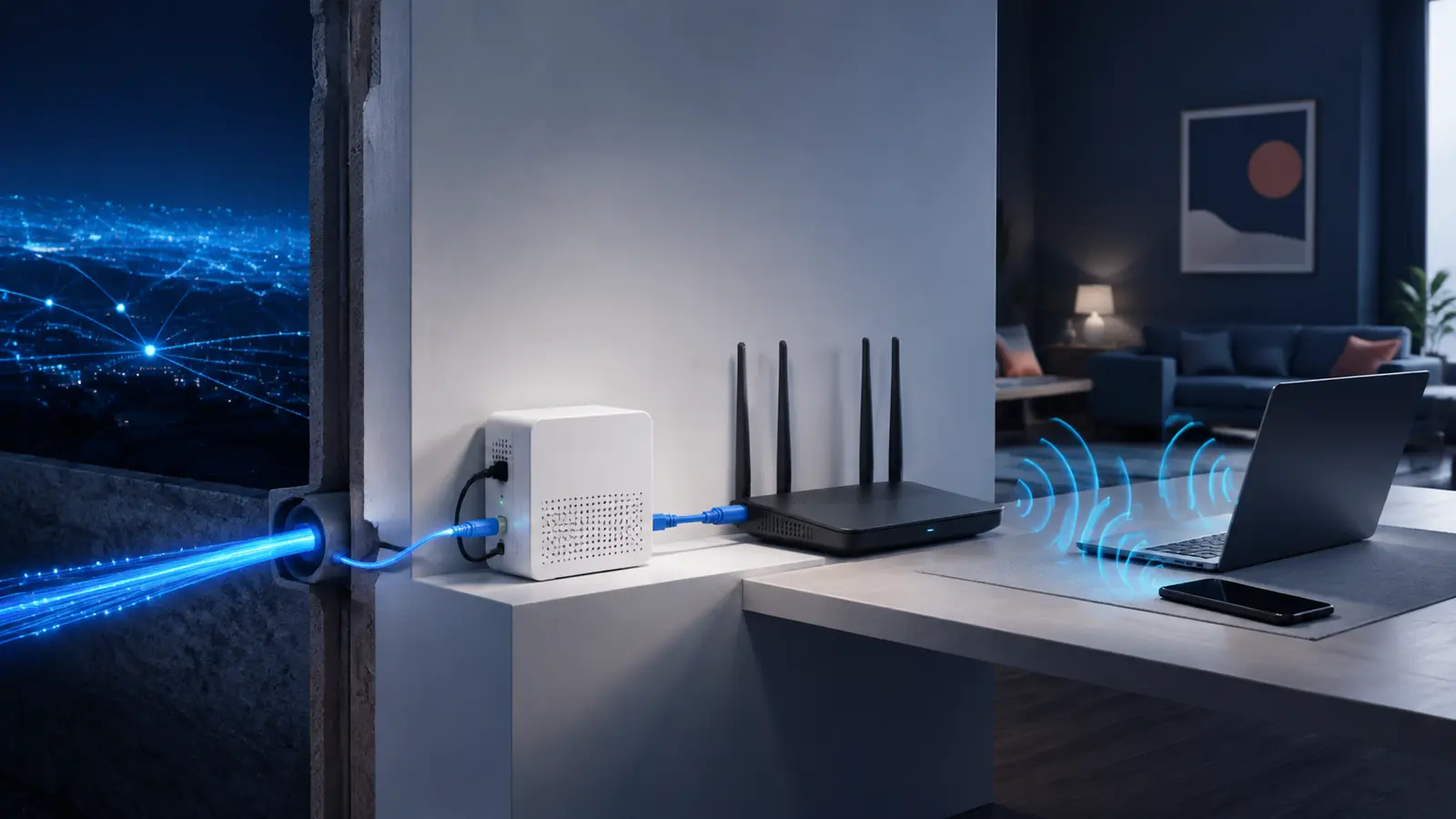
How does Wi-Fi work? Your phone, laptop and television exchange information with a nearby access point by radio. The access point passes that information into your home network, and the router sends internet traffic toward your service provider. Wi-Fi is therefore the local wireless part of the journey—not the internet itself.
That distinction matters. A perfect Wi-Fi signal cannot repair an internet outage, while fast fiber can still feel slow when a device is far from the router. This guide follows data from a device to the wider internet and explains why distance, walls, interference and equipment affect performance.
If you want to follow the journey beyond your home, SOAKJAM’s guide to how the internet crosses oceans through submarine cables explains the long-distance part of the network.
Quick answer: A Wi-Fi access point changes digital data into carefully organized radio signals. A compatible device receives those signals, checks the destination and error information, and sends its own radio response. A router then moves traffic between the local network and the internet.
How does Wi-Fi work in simple terms?
At the simplest level, how does Wi-Fi work? It replaces the network cable between a device and a local access point with radio waves. Both ends follow the same communication rules so they agree on the frequency, timing, security method and format of every transmission.
Those rules come from the IEEE 802.11 family of standards. The original 802.11 standard appeared in 1997, and later versions increased capacity, efficiency and reliability. IEEE’s overview of Wi-Fi’s evolution describes how this standards family became the foundation of modern wireless local-area networks.
The access point repeatedly announces that a network is available. A device sees the network name, requests to join, proves it has permission when security is enabled and receives the settings needed to communicate. After that, data moves in short radio transmissions called frames. The process happens rapidly enough that a video call or online game can appear continuous.
Wi-Fi and the internet are not the same thing
Wi-Fi creates a local network within an area such as a home, school, office or café. The internet is the larger collection of networks that connects services and people around the world. A router links the local network to that wider system.
You can have Wi-Fi without internet access. A phone may still reach a wireless printer or local media server during an outage: the local link works, but the router has no route to online services. Conversely, an Ethernet-connected computer can use the internet when the Wi-Fi access point is off.
People asking “how does Wi-Fi work?” are often really asking about the whole connection. In a typical fiber home, the path looks like this:
- A fiber or other provider line reaches a modem or optical network terminal.
- An Ethernet connection carries data to a router.
- An access point inside or attached to the router creates the Wi-Fi network.
- Your device uses radio for the short link to that access point.
- The router sends internet-bound traffic through the provider connection.
How does Wi-Fi work when a device joins?
1. The device discovers nearby networks
An access point sends management information that helps nearby devices discover it. Your phone or computer can also actively ask which networks are available. The list you see usually shows a service set identifier, better known as the SSID or network name.
2. The device authenticates and associates
When you choose a protected network, the device and access point perform a security exchange. The password helps them establish cryptographic keys that protect later traffic. The device then associates with the access point, creating a working radio link.
3. The network assigns an address
Most home routers use DHCP to give the device a private Internet Protocol address and other network settings. The router commonly uses network address translation, or NAT, when several local devices share one public internet connection.
4. The router forwards each packet
When you open a website, the device divides the exchange into packets. Wi-Fi carries those packets across the radio link inside 802.11 frames. The router examines the destination and forwards the traffic along the appropriate path. Replies return to the router, cross the local Wi-Fi link and reach the requesting device.
How does Wi-Fi work with radio waves?
Radio waves are part of the electromagnetic spectrum. A transmitter does not send a spoken message through the air. Instead, it changes properties of a radio carrier in precise patterns that represent digital information. A receiver measures those patterns and reconstructs the bits.
Modern Wi-Fi divides a channel into many closely spaced subcarriers. Think of it as transporting parts of the data in parallel instead of placing everything on one narrow path. Newer systems can allocate groups to different devices, improving efficiency when many users are active.
Multiple-input, multiple-output technology—MIMO—uses several antennas and signal paths to carry more than one data stream under suitable conditions. Beamforming coordinates transmissions in a useful direction; it is not a rigid laser beam, but it can improve the received signal.
Wi-Fi is a shared and polite medium. A device normally listens before transmitting, waits if the channel is busy and tries again after a short randomized delay. This reduces collisions, but it also means every active device competes for airtime. That is one reason the maximum link rate displayed by a device is not the same as the speed an application will receive.
How does Wi-Fi work on 2.4, 5 and 6 GHz?
Wi-Fi can operate in several radio-frequency bands. Frequency affects coverage, available channels, channel width, interference and the equipment that can connect. The exact channels and allowed power depend on national regulations.
| Band | Typical advantage | Typical trade-off | Often useful for |
|---|---|---|---|
| 2.4 GHz | Longer practical reach and better passage through many obstacles | Less spectrum and frequent congestion from neighboring networks and devices | Distant rooms, basic smart devices and light browsing |
| 5 GHz | More channel choices and strong capacity at short to moderate range | Usually loses strength through walls faster than 2.4 GHz | Laptops, televisions, calls and gaming near an access point |
| 6 GHz | Additional clean spectrum and very wide channels for compatible equipment | Requires newer devices and generally has less useful reach through obstacles | High-capacity Wi-Fi 6E and Wi-Fi 7 connections at close range |
The U.S. Federal Communications Commission opened a large part of 6 GHz for unlicensed use in 2020. The FCC’s 6 GHz order also shows why regional rules matter: equipment must follow each country’s channel and power requirements.
Higher frequency does not automatically mean a faster internet connection. A clean 5 or 6 GHz channel may support more data near the access point, but a stable 2.4 GHz connection may work better at the far end of a home. The best band is the one that provides adequate capacity and reliability at the device’s actual location.
Channels, channel width and interference
Each Wi-Fi band is divided into channels. Nearby networks using the same or overlapping spectrum must share airtime. Automatic channel selection usually works well, but a crowded apartment building can still contain many access points competing in the same area.
A wider channel can carry more data under clean conditions, much as a wider road can accommodate more traffic. It also occupies more spectrum. In congestion, the widest setting can create more overlap and be less stable than a narrower channel.
Non-Wi-Fi equipment can contribute noise too. Bluetooth devices, some cordless equipment and microwave ovens use or affect the 2.4 GHz region. Usually this causes a temporary reduction in performance rather than a complete failure. Physical materials are often more important: dense concrete, stone, metal, mirrors and water can weaken or reflect radio energy.
What do the modem, router and access point do?
Home equipment combines several jobs in one box, so the names are often blurred. Separating the functions makes the question “how does Wi-Fi work?” easier to answer.
| Component | Main job |
|---|---|
| Modem or optical network terminal | Connects the premises to the service provider’s cable, telephone, fixed-wireless or fiber system. |
| Router | Moves packets between networks and usually provides addressing, NAT and basic firewall functions. |
| Wireless access point | Creates the local radio network and bridges Wi-Fi devices to the wired local network. |
| Ethernet switch | Connects several wired devices within the same local network. |
A product called a “wireless router” normally contains a router, access point and small Ethernet switch. Some provider gateways add the modem or optical function as well. Larger homes and offices may use one router with several separate access points. This spreads radio coverage without creating multiple independent internet connections.
Wi-Fi generations from Wi-Fi 4 to Wi-Fi 7
Consumer names make IEEE 802.11 generations easier to recognize. A new generation may improve efficiency, latency and performance with many devices—not only theoretical speed.
| Consumer name | IEEE generation | Main bands commonly associated with it |
|---|---|---|
| Wi-Fi 4 | 802.11n | 2.4 and 5 GHz |
| Wi-Fi 5 | 802.11ac | 5 GHz |
| Wi-Fi 6 | 802.11ax | 2.4 and 5 GHz |
| Wi-Fi 6E | 802.11ax extended into 6 GHz | 6 GHz in addition to the usual compatible bands |
| Wi-Fi 7 | 802.11be | 2.4, 5 and 6 GHz where permitted |
Wi-Fi 7 is based on IEEE 802.11be. The official IEEE 802.11be standard page describes a high-throughput wireless LAN generation with improvements including wider operation and more efficient use of links and spectrum. Real results still depend on the router, client, band, channel conditions, provider connection and application.
Compatibility generally works across generations, but a connection uses capabilities supported by both ends. A Wi-Fi 7 router does not turn a Wi-Fi 5 phone into a Wi-Fi 7 device.
Why does Wi-Fi slow down?
A speed test reports the result of an entire path, not just the radio link. The slowest relevant part becomes the bottleneck. Common causes include:
- Distance: radio energy spreads and weakens as a device moves away from the access point.
- Walls and objects: dense building materials, metal and large appliances absorb, block or reflect signals.
- Congestion: local devices and neighboring networks share limited airtime.
- Interference: other equipment raises radio noise or briefly occupies overlapping spectrum.
- Old equipment: an older router or client may support fewer antennas, narrower channels or less efficient standards.
- Weak backhaul: an extender or mesh unit may have a poor connection to the main router.
- Internet limits: the provider plan, service outage, remote server or busy route may be slower than the Wi-Fi link.

Devices answer a weak or noisy signal by using slower, more robust settings and retransmitting damaged frames. That protects accuracy but reduces useful throughput. Signal-bar displays do not translate into a fixed speed.
How to improve Wi-Fi coverage and speed
Place the access point well
Start with position before buying more equipment. Put the access point near the center of the area you use, elevated and in the open rather than inside a cabinet or behind a television. Keep some distance from large metal objects, dense concrete and equipment that can create interference. The FCC’s home network tips similarly recommend a central location and discuss extenders or mesh systems for difficult spaces.
Use the right band for the location
Try 5 or 6 GHz for a compatible device close to an access point and 2.4 GHz when reach matters more than peak capacity. Many modern systems use one network name and steer devices automatically. Manual separation is useful for troubleshooting, but it is not required for every home.
Add coverage with a wired foundation when possible
For a large or heavily built home, an additional access point connected by Ethernet often provides the most predictable result. A mesh system can simplify coverage and roaming, especially when units have a strong wired or wireless backhaul. A basic repeater can help in a small dead zone, but placing it where the original signal is already poor gives it little useful capacity to repeat.
Test one layer at a time
Compare an Ethernet test with Wi-Fi near the router, then test in the problem room. Check placement, device capability, congestion, cables, firmware and provider status. This separates an internet problem from a local radio problem.
How to keep a Wi-Fi network secure
Radio signals can extend beyond the walls of a home, so encryption and access control are essential. Use WPA3 when all important devices support it, or WPA2 with strong modern encryption for compatibility. Choose a long, unique Wi-Fi password and a separate strong administrator password for the router.
Install firmware updates, disable obsolete security modes when possible and remove devices you do not recognize or use. A guest or isolated network can separate visitors and simple smart-home devices from trusted computers.
NIST’s guidelines for securing wireless local-area networks emphasize secure configuration and ongoing monitoring. CISA’s home network security guidance also recommends changing default credentials, using encryption and keeping network devices updated. Hiding the network name is not a substitute for these protections.
Wi-Fi compared with Ethernet, mobile data and Bluetooth
| Technology | Best understood as | Typical strength |
|---|---|---|
| Wi-Fi | A local wireless network connected through an access point | Flexible access for many devices across rooms |
| Ethernet | A wired local network connection | Stable performance, low interference and predictable backhaul |
| Mobile data | A wide-area connection through a cellular operator | Internet access while moving beyond a local Wi-Fi network |
| Bluetooth | A short-range personal connection between nearby devices | Low-power accessories, audio and simple device links |
These technologies complement one another. A phone can receive data through 5G, share it through a Wi-Fi hotspot and send audio over Bluetooth. Ethernet can provide a more consistent local link for fixed equipment.
Frequently asked questions
How does Wi-Fi work without internet?
The access point can continue carrying local traffic even when the router cannot reach the service provider. Devices may still communicate with printers, local storage, smart-home controllers or one another, but websites and cloud services will be unavailable.
Does Wi-Fi travel through walls?
Yes, but every material changes the signal. Drywall usually reduces it less than reinforced concrete, stone or metal. Reflections can also create strong and weak spots, which is why moving a router or device a short distance sometimes makes a noticeable difference.
Does a better router increase internet speed?
It can remove a local bottleneck if the existing router is old, overloaded or poorly placed. It cannot make a provider connection faster than the plan or service allows. Test by Ethernet and near the router before deciding which part needs improvement.
Why is Wi-Fi fast beside the router but slow in another room?
Distance, walls, reflections and interference reduce signal quality. The devices then choose slower, more reliable radio settings and may repeat transmissions. Better placement, a nearer access point or a well-positioned mesh unit can improve the link.
How many devices can connect to one Wi-Fi network?
There is no useful universal number. The practical limit depends on the access point, software, available airtime and what each device is doing. Dozens of idle sensors require far less capacity than several televisions streaming high-resolution video.
Is 5 GHz Wi-Fi the same as 5G?
No. In Wi-Fi, 5 GHz describes a local radio-frequency band. 5G is a generation of cellular-network technology operated over several possible frequency ranges. A phone can support both, but they connect through different networks.
Transparency
Sources & references
Editorially reviewed
Editorial information
SOAKJAM articles are designed for clarity, useful context and transparent sourcing. Important facts should be checked against the linked primary sources.
Found an error, outdated detail or a useful source we should consider?